GST invoices with the right splits
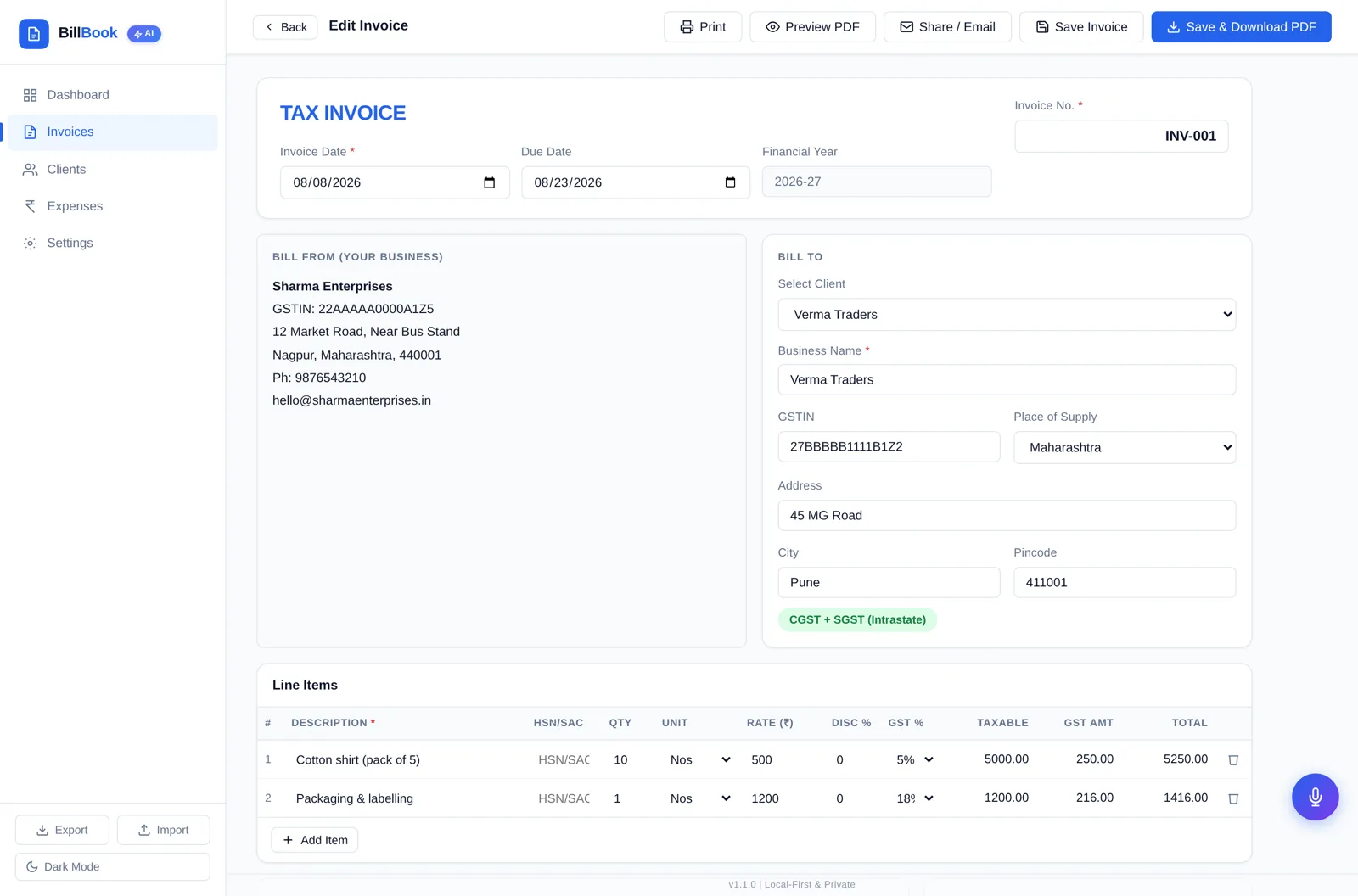
Line items with HSN/SAC, per-item GST rate and discount, automatic CGST + SGST or IGST based on place of supply, round-off and grand total.
Local-first · one-time ₹299 · v1.1.0
BillBook makes GST invoices, tracks clients and expenses, and shows what you're owed — running in your own browser, with your data saved on your device instead of someone else's cloud. Pay ₹299 once and keep using it.
Interactive demo
A walkthrough of the steps inside the app, with sample figures. Nothing here is saved or sent anywhere, and no sign-up is involved.
Invoice ready — download the PDF or mark it paid.
₹299 once
Not ₹299 a month.
Local-first
Data stays in your browser.
No installer
Open one file and start.
No account
Nothing to sign up for.
A recurring plan keeps adding up while the work stays the same. BillBook takes the opposite approach: one download, one payment, one folder on your machine. The invoices you have already made keep opening whether or not you buy anything from us again.
A recurring plan, month after month
₹2,988after 12 months
Illustration only, at an example ₹249 per month. It is not the price of any particular product — check current terms wherever you subscribe.
BillBook
₹299one time
The same ₹299 in month 1, month 12 and month 60. No recurring BillBook subscription.
Pick a monthly amount and a period, and compare it with paying ₹299 once.
Plain arithmetic: ₹499 × 12 × 3. These amounts are examples you pick, not the advertised price of any particular billing product.
Dashboard, invoices, clients, expenses, receipt scanning and voice mode — all in one file. These are real screenshots of BillBook v1.1.0 with sample data.
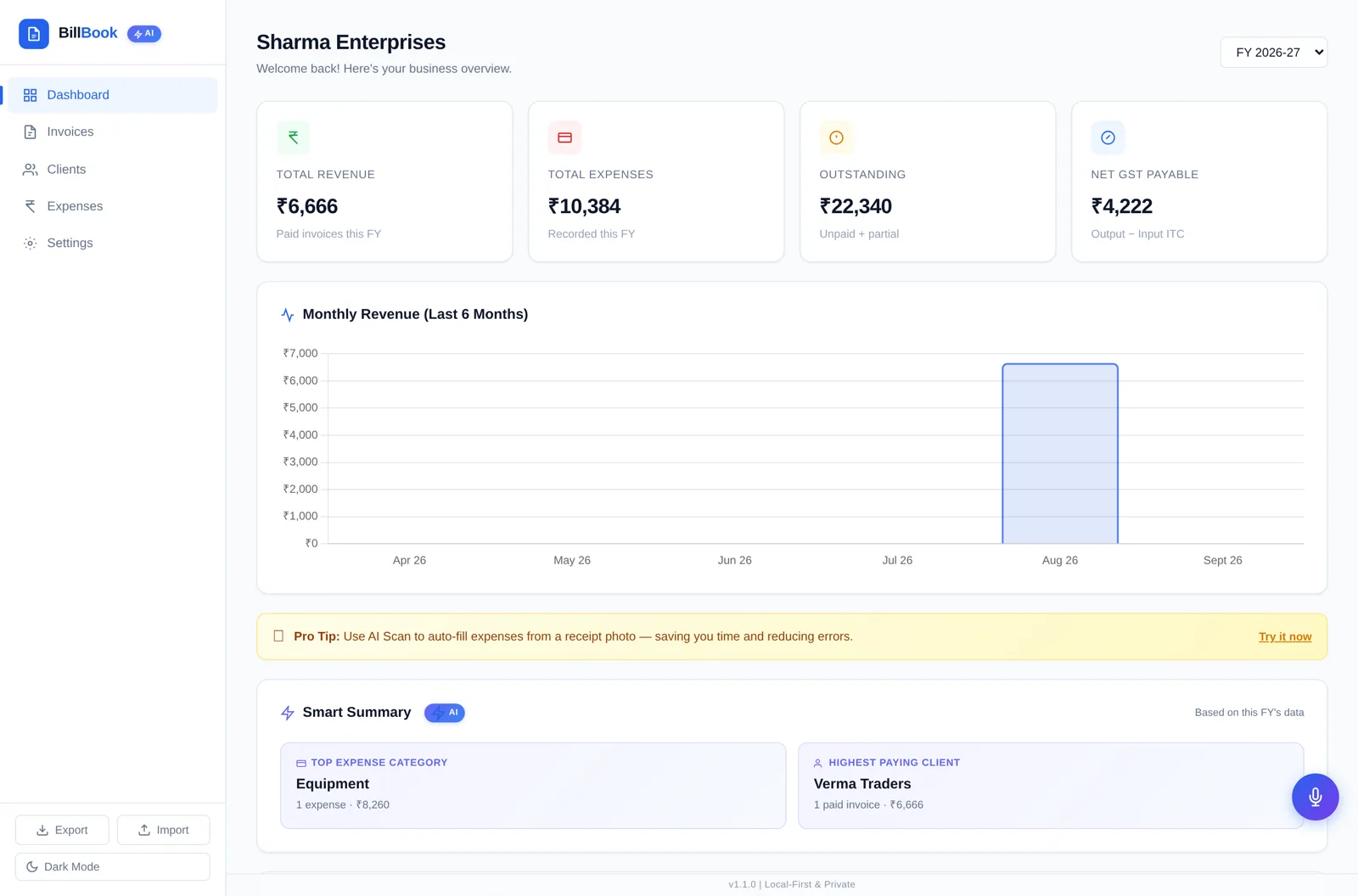
Opening the app shows totals billed, GST collected, outstanding amounts and your most recent invoices, so you know where the month stands before you do anything else.
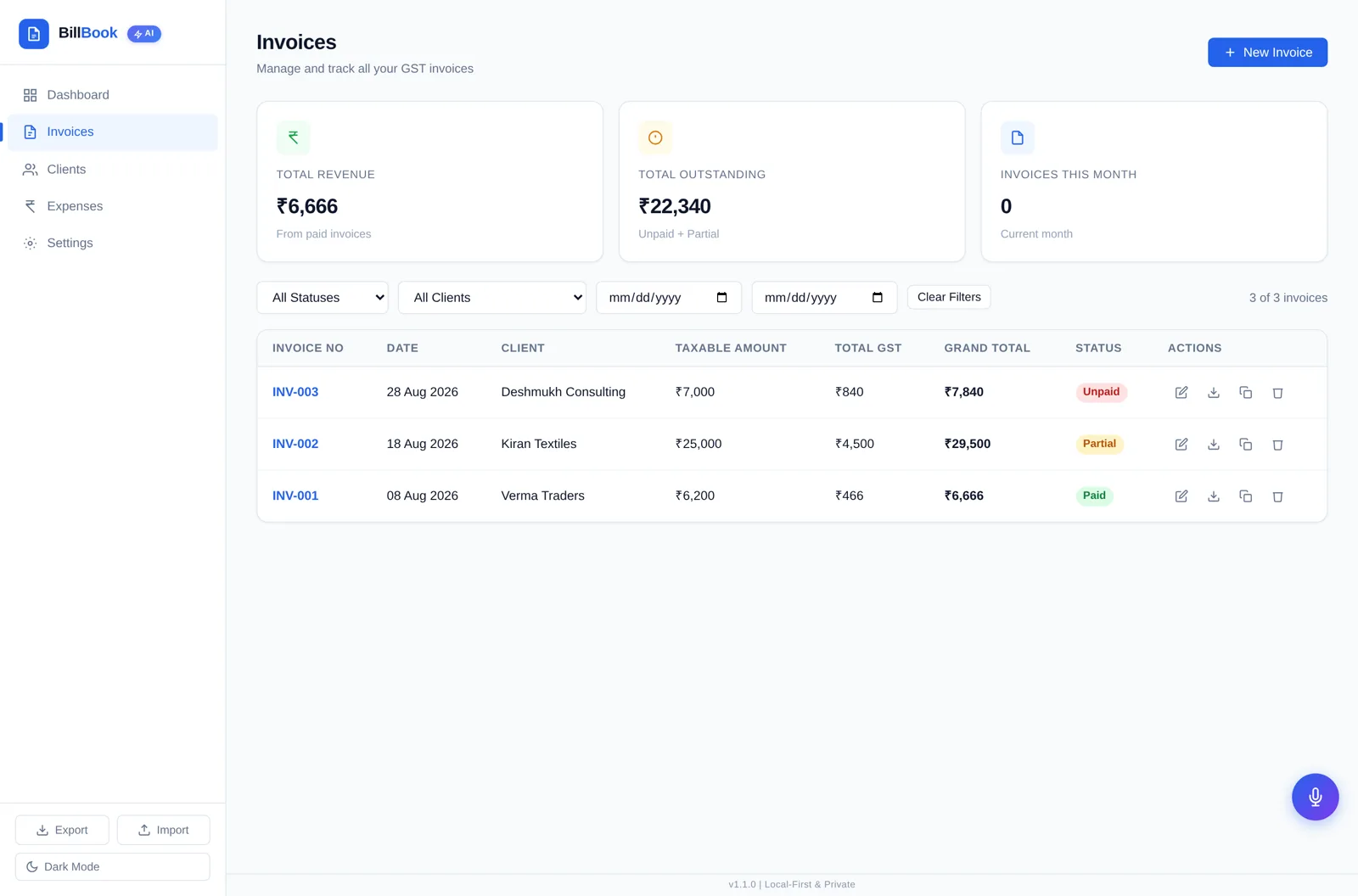
Every invoice is listed with its number, date, client, amount and payment status. Filter by status or financial year, reopen an invoice to edit it, or download the PDF again.
Add line items with description, HSN code, quantity, rate, discount and GST rate. BillBook works out the taxable value, applies CGST/SGST or IGST from the place of supply, adds round-off and gives you a tax-invoice PDF.
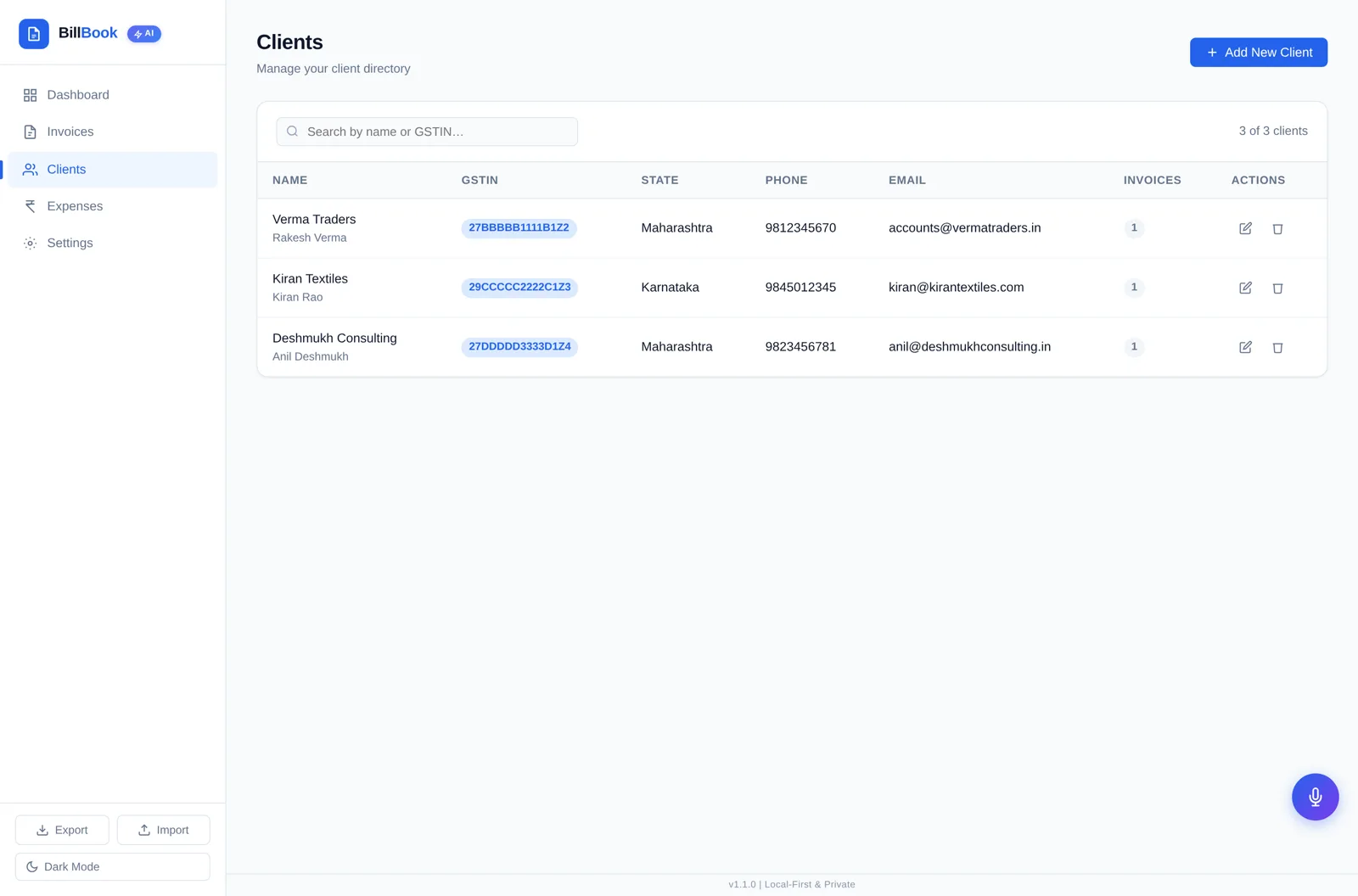
Save each customer once with business name, GSTIN, contact, phone, email and full address. Pick them on the next invoice instead of retyping their details.
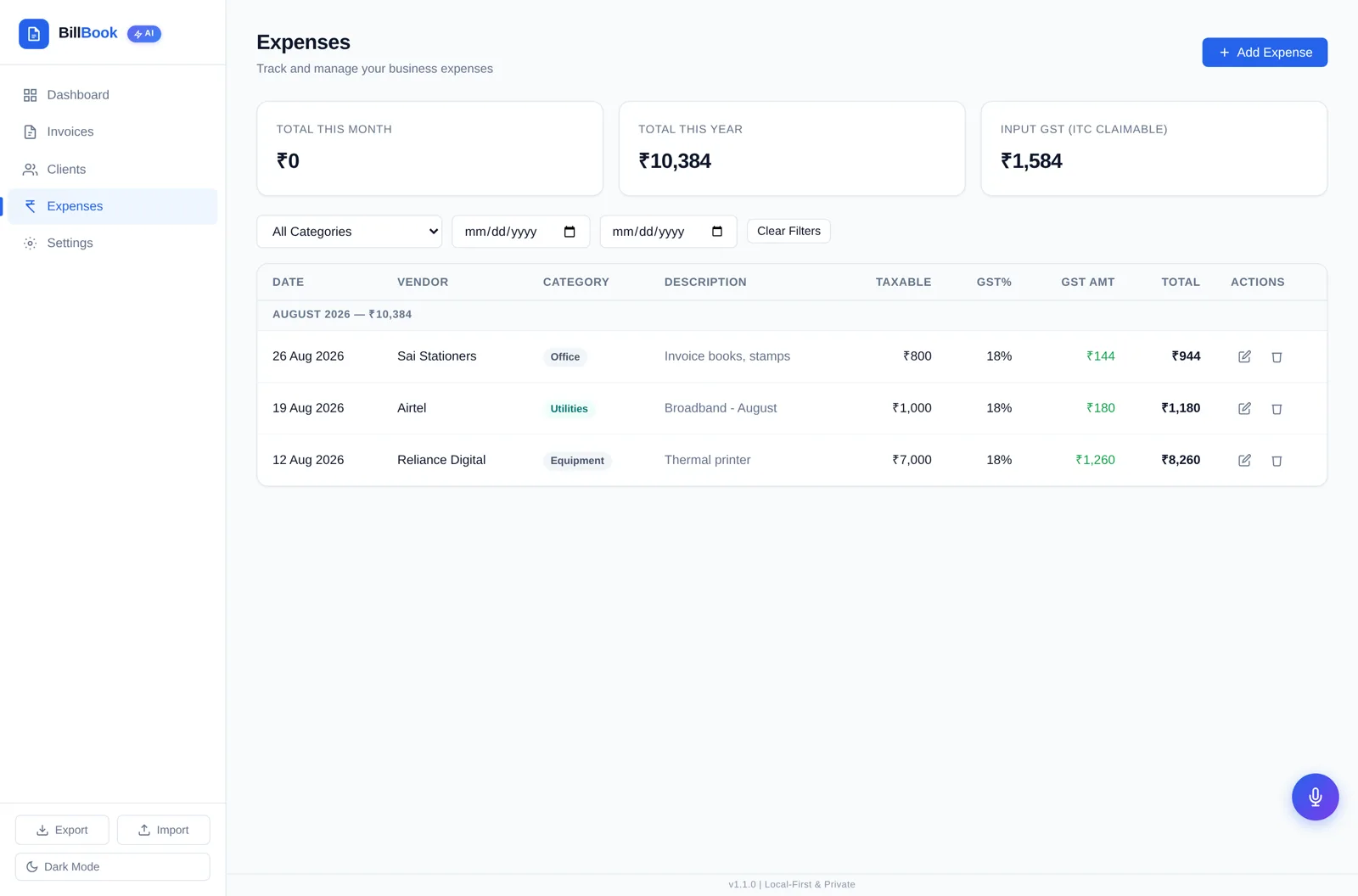
Record purchases with vendor, category, date, total and GST rate. BillBook splits taxable value and GST so your input-tax-credit figures are ready when you file.
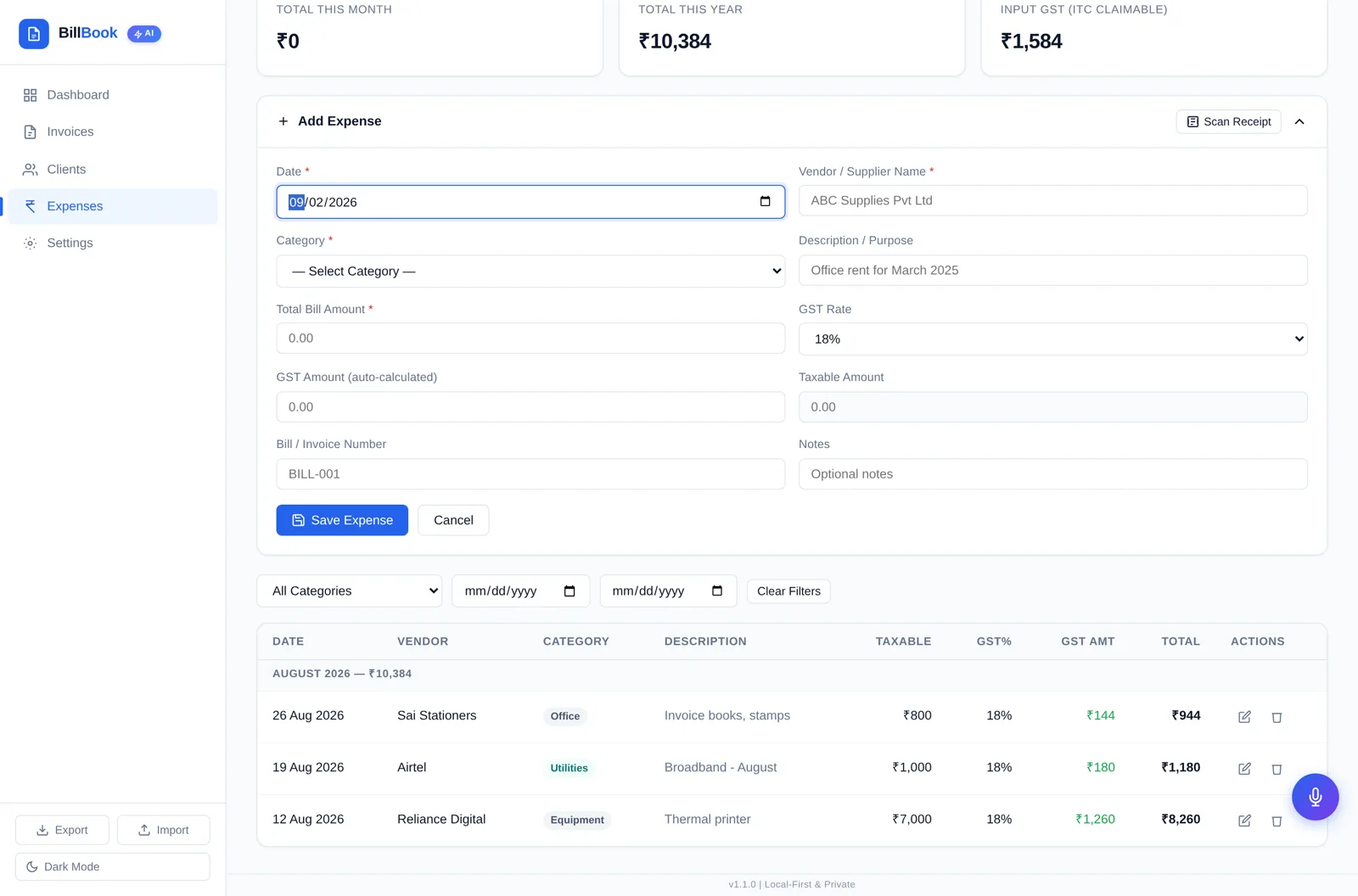
Point the scanner at a photo of a bill and it reads vendor, date and total using the OCR files included in the download — on your machine, with nothing uploaded. Check the values, then save the expense.

Where your browser supports speech recognition, you can speak an invoice instead of typing it. BillBook fills the client, item, quantity and rate into a draft for you to review.
Line items with HSN/SAC, per-item GST rate and discount, automatic CGST + SGST or IGST based on place of supply, round-off and grand total.
Download a clean tax-invoice PDF with your business header, client details, tax breakup, notes and bank/UPI payment details.
Save each client's business name, GSTIN, contact, phone, email and full address once, then pick them on any future invoice.
Record purchases by category with GST rate, and BillBook works out the taxable value and the input GST you can claim.
Revenue from paid invoices, expenses recorded, outstanding from unpaid and partial invoices, net GST payable, and a monthly revenue chart.
Invoices carry their financial year and you can switch the FY view, so 2025-26 and 2026-27 stay separate at filing time.
Mark invoices Paid, Partial or Unpaid with the amount received, and see outstanding money add up on the dashboard.
One click writes a JSON backup of everything; one click restores it on another browser or device. Your data is yours to move.
GST rates and rules change. Verify current rules with official government sources or your CA before filing.
Step 1 · Buy
One payment. Gumroad emails your receipt and download link.
Step 2 · Download
You get the app file plus the bundled OCR files, a readme and a shortcuts cheatsheet.
Step 3 · Open
Double-click index.html. No installer, no admin rights, no login.
Step 4 · Bill
Add your GSTIN, address, invoice prefix and bank details once — then create your first invoice.
Step 5 · Back up
Click Export to keep a copy of your settings, clients, invoices and expenses somewhere safe.
Back up regularly. Use Export to save a JSON copy of your data — clearing browser data or switching browsers can otherwise leave BillBook empty.
Use one main device. BillBook opens on phones too, but a laptop or desktop browser is the comfortable place to keep your books, since data doesn't sync between devices.
BillBook has no server for your business data and no account system. Your settings, clients, invoices and expenses are written to your browser's local storage on the device where you use it, and they stay there.
The honest trade-off: because there is no cloud copy, nobody can restore your data for you. Browser storage lives per browser and per device — clearing site data, switching browsers, using a private window or moving the folder can make BillBook open empty. Your JSON export is your safety net, so take one after any busy billing day.
Core business data is stored locally in browser storage.
There is no BillBook server in this picture, so nobody can restore your data for you — take a JSON export regularly.
Cloud architecture may transmit/store data remotely.
Architectures differ between products. Read the privacy terms of any tool you use, and treat this as a general shape rather than a claim about a specific vendor.
JSON backup file you export — written only when you click Export.
Invoice PDFs you download — saved to your own downloads folder.
Voice Mode · demo
Ready
“Invoice Sharma Traders for 5 cotton shirts at ₹500 each.”
Invoice draft ready — review it before saving.
Voice Mode uses supported browser speech recognition. Availability and internet requirements vary by browser and device. This demo is a scripted illustration: it does not ask for microphone access and records nothing.
Voice Mode
Tap the mic and speak an instruction like "invoice Sharma Traders for 5 cotton shirts at ₹500". BillBook turns it into a draft invoice you can check and adjust before saving.
Receipt scanner
Click Scan Receipt on the expense form and pick a photo. BillBook reads the text with Tesseract OCR — bundled inside your download and running in your browser — then pre-fills the vendor, amount and date fields.
Local OCR · demo
ABC STATIONERY
GSTIN 27ABCDE1234F1Z5
12 Aug 2026
A4 paper x2 420.00
Pens x10 120.00
File covers 210.00
GST 12% 90.00
TOTAL 840.00
Saved as an expense with its GST split, ready for your input-tax records.
Scanning runs on your own machine using the OCR files bundled with the download, so receipts are not uploaded anywhere. Accuracy depends on the photo — always check the values before saving.
Service invoices with SAC codes and a few retainer clients.
For example: Designer finishes a logo project, picks the saved client, adds one line at ₹25,000 with 18% GST, downloads the PDF and emails it the same evening.
A handful of GST invoices a day, printed or emailed, from a reused client list.
For example: Counter sale of 5 cotton shirts at ₹500: pick the item line, 5% GST splits into CGST and SGST, print the invoice before the customer leaves.
Monthly retainers, interstate clients, and expenses to claim input tax on.
For example: Advisory retainer billed to a Karnataka client from a Maharashtra GSTIN, so BillBook charges IGST instead of CGST and SGST.
Item-wise HSN, per-line GST rates and discounts, plus purchase records.
For example: Three line items at different GST rates with a 5% discount on one of them; the taxable value, tax split and round-off come out on the same PDF.
Low volume, where a monthly subscription simply isn't worth it.
For example: Four invoices a month and a folder of receipts — scanned into expenses so the input GST is ready for the CA at quarter end.
Weak or metered internet at the counter, on site, or at an exhibition stall.
For example: Exhibition stall with no usable network: invoices are created and PDFs downloaded from the laptop all day, then backed up as JSON that night.
This compares how products are typically built and sold, not specific vendors or their prices. Check any tool's current terms before you decide.
| What matters | BillBook | Typical cloud billing app |
|---|---|---|
| Pricing model | ₹299 one-time for v1.1.0 | Subscription / paid plans may apply |
| Where data lives | Your browser, on your device | Cloud-first, on the vendor's servers |
| Account needed | No account for core use | Usually an account and login |
| Works offline | Core invoicing works offline | Usually needs a connection |
| Sync across devices | No sync — move data via JSON export | Usually yes, varies by plan |
| Invoice limits | No limit inside the app | Varies by plan |
| Backups | Your own JSON export | Managed by the vendor |
| GST return filing | Not included | Varies by product and plan |
| Setup | Unzip and open one file | Sign up and configure online |
Everything below is included in BillBook v1.1.0, for one payment. Payment and download are handled by Gumroad.
Instant download after payment. Support: insighteyecare9988@gmail.com. Receipts and refund requests are handled by Gumroad under their terms.
If something here doesn't answer your case, email insighteyecare9988@gmail.com before you buy.
Yes. You pay ₹299 once through Gumroad and download BillBook v1.1.0. There is no monthly or yearly subscription, no per-invoice fee and no user limit inside the app.
The core work — creating GST invoices, downloading invoice PDFs, managing clients, recording expenses and viewing the dashboard — runs entirely in your browser and works with the internet switched off. Two optional features can need a connection: Voice Mode uses your browser's speech recognition (many browsers send audio to their own service), and the very first receipt scan may download the OCR language data if it is not already cached.
In your browser's local storage on the device where you open BillBook. Nothing is uploaded to a BillBook server, because BillBook has no server or account system for your business data.
Browser storage is per browser and per device. If you clear site data or browsing data with 'cookies and site data' selected, use a different browser or a private window, or move the BillBook folder to a different path, the app may open empty. This is why BillBook includes Export and Import buttons — take a JSON backup regularly and keep a copy somewhere safe.
Click Export in the sidebar to download a JSON backup of your settings, clients, invoices and expenses. Click Import and select that file to restore it — on the same device, a new device, or after switching browsers.
You can open the same BillBook file on as many of your own devices as you like, but the data does not sync between them. Each browser keeps its own copy. To move data across devices, use Export on one and Import on the other.
No. Core use needs no BillBook account, no email verification and no login. You only interact with Gumroad, at purchase time, to get the download.
BillBook produces tax invoices with your business name, GSTIN, invoice number and date, client details, place of supply, HSN/SAC per line, taxable value, CGST + SGST or IGST split, round-off and grand total, plus your bank and UPI details. GST rules change and every business is different, so please have your invoice format confirmed by your CA before you rely on it for filing.
Yes. You set your own state in Settings and the place of supply on the invoice. When they match, BillBook splits the tax into CGST and SGST; when they differ, it charges IGST instead.
No. BillBook is not connected to the GST portal and does not file anything on your behalf. It keeps your sales, purchase and input-tax figures organised so you or your CA can file, and lets you export your data.
It runs Tesseract OCR, bundled inside the download, on the receipt photo you select and reads the text locally in your browser to pre-fill the expense form. Accuracy depends on how clear the photo is — always check the amount, vendor and GST before saving.
Voice Mode uses your browser's built-in speech recognition to turn a spoken instruction like "invoice Sharma Traders for 5 cotton shirts at ₹500" into a draft. Availability depends on your browser and device, some browsers process the audio on their own servers, and you should always review the draft before saving.
Any reasonably current desktop browser — Chrome, Edge, Firefox or Safari. It also opens on phones and tablets, but invoicing on a laptop or desktop is far more comfortable, and we recommend keeping your main data on one desktop browser.
No installer, no admin rights, no app store. You unzip the download and open index.html in your browser. Keep the folder intact — the OCR files sit next to the HTML file.
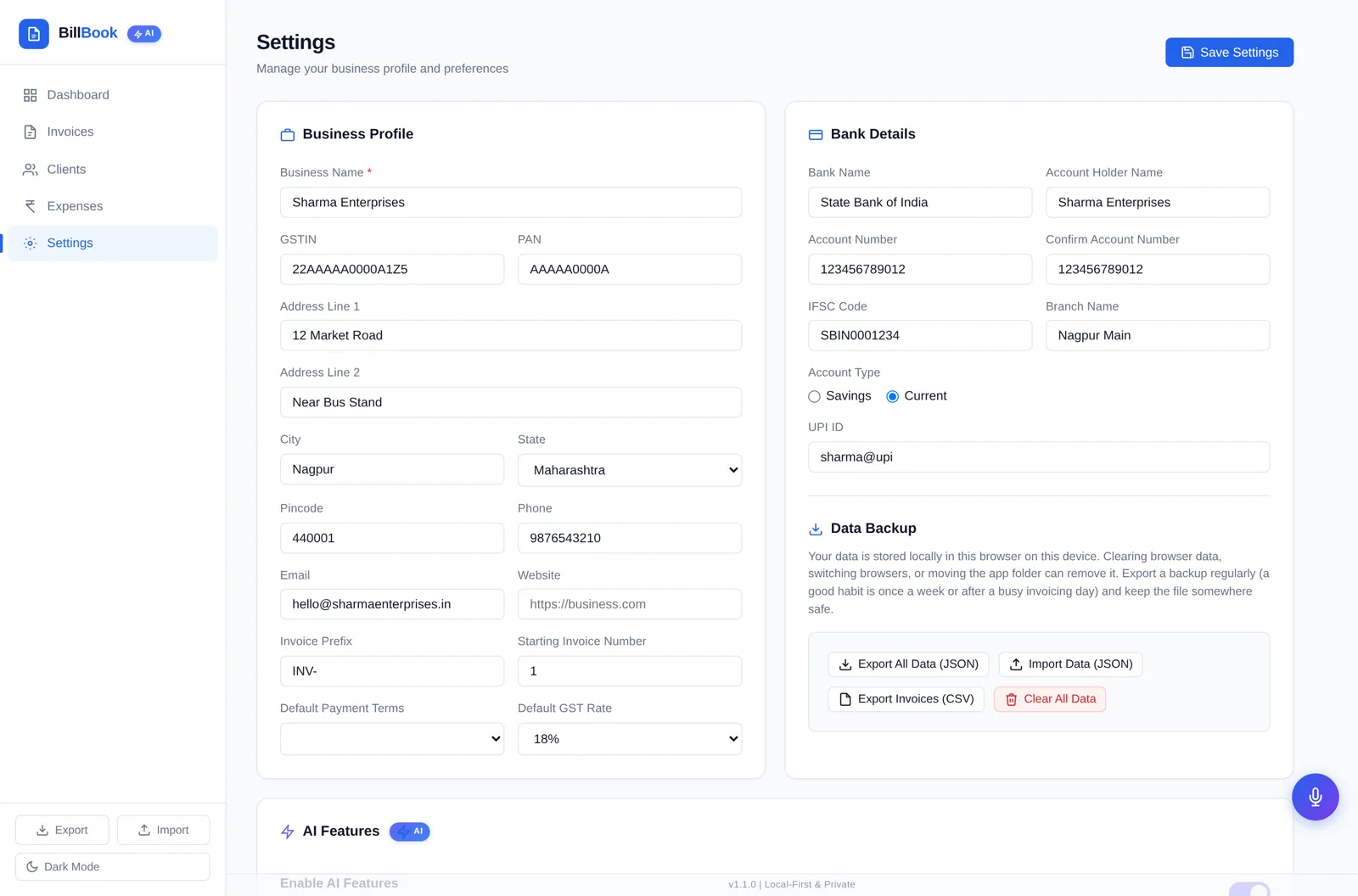
Yes. Settings holds your business name, GSTIN, PAN, address, phone, email, website, invoice prefix and starting number, default GST rate, payment terms, bank account details, IFSC and UPI ID, which then appear on your invoices.
Gumroad gives you an immediate download of BillBook v1.1.0 as a ZIP: the app file, the bundled OCR files, a readme and a shortcuts cheatsheet. Nothing else is required.
Email insighteyecare9988@gmail.com with your question. Purchases, receipts and refund requests are handled by Gumroad under Gumroad's own terms — request one through your Gumroad purchase, and write to us if you'd like help first.